Explainer · Working system
Finance with Claude and Obsidian: how I keep track of everything
By Jordan Supowit · ~10 min read
The problem nobody names
A finance leader holds context on operations, sales, legal, HR, M&A, board work, and the close — simultaneously. The CFO who answers four different questions on a call about four different topics, accurately, without notes — that’s the job.
Project-management tools optimize for task focus. Document tools optimize for one document. Neither solves “what is the running state of everything I’m responsible for?” You end up with eight tabs open, a notebook with last week’s half-finished thoughts, and a folder of memos that already feel stale.
The Slack pings keep coming. The board memo is due Friday. The Mexico audit is two questions away from being closed. None of those things share a system. None of them talk to each other. You become the integration layer. The job is exhausting because most of it is paged in from memory, not from a tool.
What I run instead
A local Obsidian vault — plain markdown files on my laptop, no cloud lock-in — as the running mental model. Claude on top, reading the vault as memory at the start of every session and writing back at the end. An auto-memory layer for rules and style preferences that persist across conversations independently of project state.
The whole system is small enough to explain in one page. The discipline is what takes a while to build.
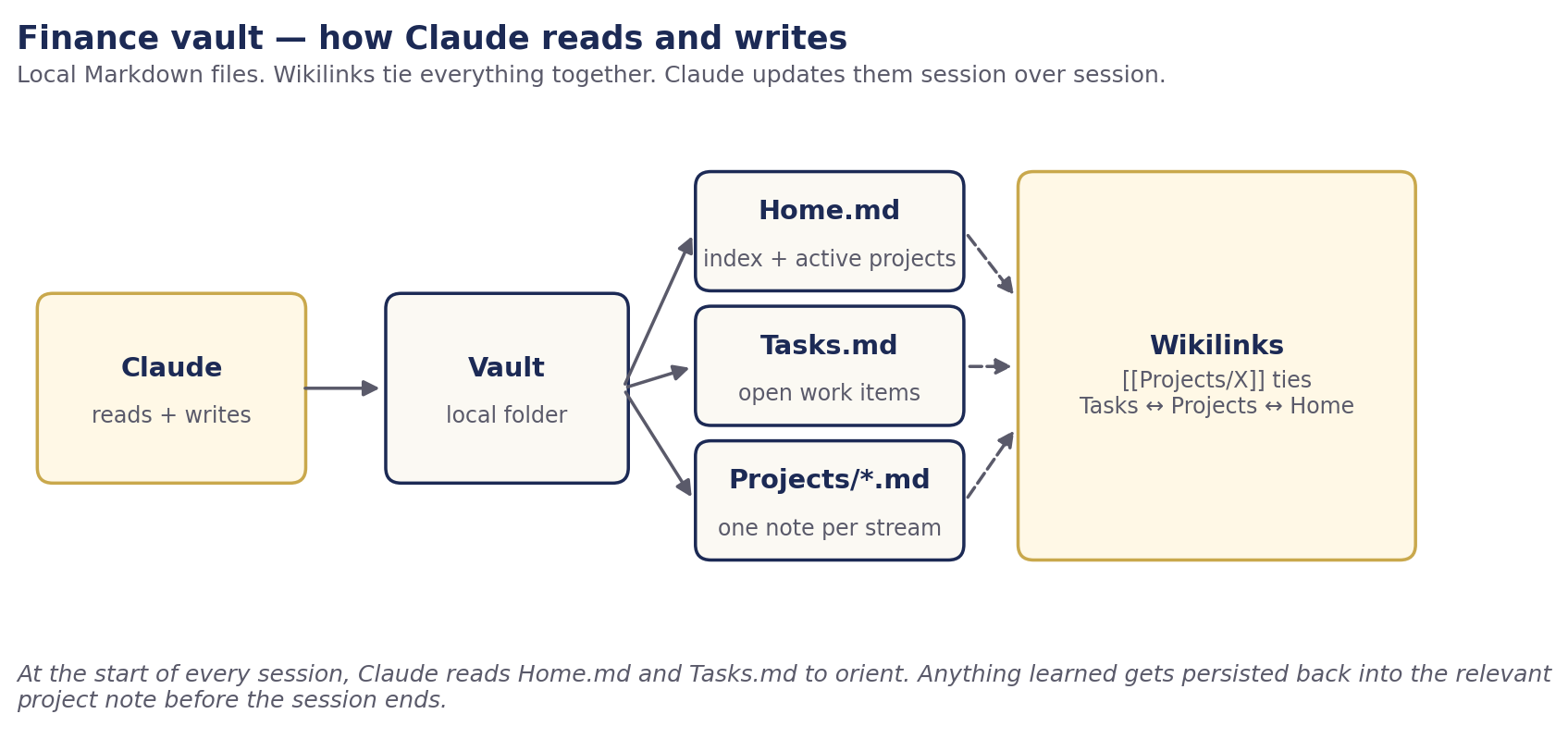
The vault, structurally
One folder. One Home.md index. One Tasks.md. One note per project, all in a Projects/ subfolder. That’s the entire shape. No nested hierarchies, no plugin gardens, no aesthetic graph view as a distraction.
finance-vault/
├── CLAUDE.md              # session protocols + style preferences
├── Home.md                # the index — what's active, where files live
├── Tasks.md               # one flat task list, tagged
└── Projects/
    ├── _Template.md       # copy this for new projects
    ├── Project Alpha.md
    ├── Project Beta.md
    └── ...
Every note has frontmatter (type, status, tags, updated). Every project links back to Tasks.md. Every task with a project tag links to its project note. The graph isn’t the point — the cross-referencing is.
Local-first matters. The vault lives on my laptop. It works offline. It survives any SaaS shutting down. It’s searchable with grep. The files are files, not API objects behind a login screen.
Claude on top — the interactive layer
The vault is the data. Claude is the interface. Two protocols glue them together.
Session start: Claude reads Home.md and Tasks.md at the start of every conversation. If the user’s question matches an active project, Claude also reads that project note. By the time it answers anything substantive, it’s loaded the running state.
Session end: Claude writes back. New decisions go into the project note. New work items go into Tasks.md. Completed work flips from - [ ] to - [x]. Frontmatter updated:dates get bumped on every touched file. The vault stays current because Claude updates it as a side effect of doing the actual work.
The protocols live in a single file at the vault root: CLAUDE.md. Claude reads it automatically (Claude Code does this by default; other clients need to be pointed at it). The starter vault below ships a working CLAUDE.md.
The discipline that makes it work
None of this is magic. The vault rots in two weeks if you stop writing. The discipline is the product. Three rules:
- Always read at session start. Claude doesn’t guess at what you’re working on. It checks. Saves you re-explaining context every conversation. Saves Claude from confabulating a status that’s wrong.
- Always write at session end. If you do real work, something changed. Persist it. Default to writing more than feels necessary — the cost is low, the cost of not writing is "I forgot why we did that."
- Keep the vault tight. One project = one note. Don’t fork notes for sub-topics. Don’t archive aggressively. Don’t add plugins until you’ve felt a real pain point that a plugin solves.
The first month is annoying. You’ll forget to update notes. Claude will tell you what it thinks the state is and you’ll have to correct it. After month one, the corrections stop because the vault has caught up to reality. After month three, you’ll wonder how you tracked anything before.
Auto-memory: rules vs. project state
If your Claude client has an auto-memory feature (Claude Code does, others may not), keep these in different places:
- Rules and style preferences live in auto-memory. “Prefer XLOOKUP over VLOOKUP.” “Negatives in accounting parentheses.” “Never name customers on public artifacts.” These persist across every conversation independently of which project you’re working in.
- Project state lives in the vault. “Project Alpha is past the LOI stage.” “Sarah owns the revenue cutoff.” This changes constantly and is project-specific. It does not belong in memory.
Keeping these separated prevents stale memory from masquerading as current state. If the deal Project Alpha was about closes and gets archived, the rule about naming customers still applies. The system gracefully degrades when the project ends.
Why this matters more for finance than for any other function
Finance is one of the few seats with line-of-sight into operations, sales, legal, HR, M&A, and the board at once. Engineering sees engineering. Sales sees sales. Finance sees all of it because every decision eventually touches a number.
The vault-plus-Claude pattern turns that breadth from a burden into an advantage. When the sales forecast assumes a product the operations team isn’t building, you notice — because both project notes are in your context. When the M&A close date conflicts with the SOX-readiness milestone, you flag it — because both deadlines are in Tasks.md. Finance becomes the alignment force, not by adding more meetings, but by holding more context.
This is the part of FP&A that doesn’t scale by hiring. You can hire another analyst to build another model. You can’t hire another you to hold the running mental model of the entire business. The vault lets you scale that anyway, by making the mental model external and queryable.
What this isn’t
A few things this system does not do, so you don’t pick it up with the wrong expectations:
- It’s not a knowledge base. Don’t put your IPO prospectus in here. Put pointers to where the prospectus lives (an absolute path, a SharePoint link). The vault holds state, not content.
- It’s not a project management tool. If you have a real PMO, keep using it for cross-team coordination. The vault is your first-person view of your own work.
- It doesn’t replace your team. Your controller still owns the close. Your analyst still owns the variance pack. The vault is for you to track your view of those workstreams — what you’ve committed to, what you’re tracking, what decisions you’ve made.
- It’s not auto-magic. If you stop writing, it rots like any wiki. The discipline is the product.
For fractional CFOs and consultants
One vault per client. Walk into a four-hour-a-week engagement context-loaded instead of context-thin. Pull up the client’s vault before the meeting, ask Claude “what’s the running state?”, and you’re current within ninety seconds of opening the laptop.
The vault becomes part of the deliverable. When the engagement ends, hand the vault to the client’s internal team or to whoever picks up next. The running mental model survives the handoff because it was always external. That’s a real differentiator for the “fractional services that don’t evaporate when the consultant leaves” pitch.
(My own consulting practice, SharpSight Finance, runs this way. It’s mentioned at the bottom of every post on this site.)
Download the starter vault
Contents: _README.md setup guide, CLAUDE.md session protocols, Home.md and Tasks.md templates, Projects/_Template.md plus two example project notes (Project Alpha quarterly close, Project Beta acquisition diligence). All generic. No client or employer data. Free to use, modify, and share. If you build on it, I’d love to hear how.
Built by Jordan Supowit · supowit.com · for fractional FP&A engagements, see SharpSight Finance.